Once you have copied the PLA Template Collection into your account, the next step is to organize it so that it reflects your work. Editing your collection allows you to rename it, provide context with descriptions and tags, and arrange your pages in the correct order. This step ensures your portfolio is both professional and easy to navigate, which is important for the reviewers who will assess your submission. The instructions below will guide you through renaming, customizing, and ordering your collection.
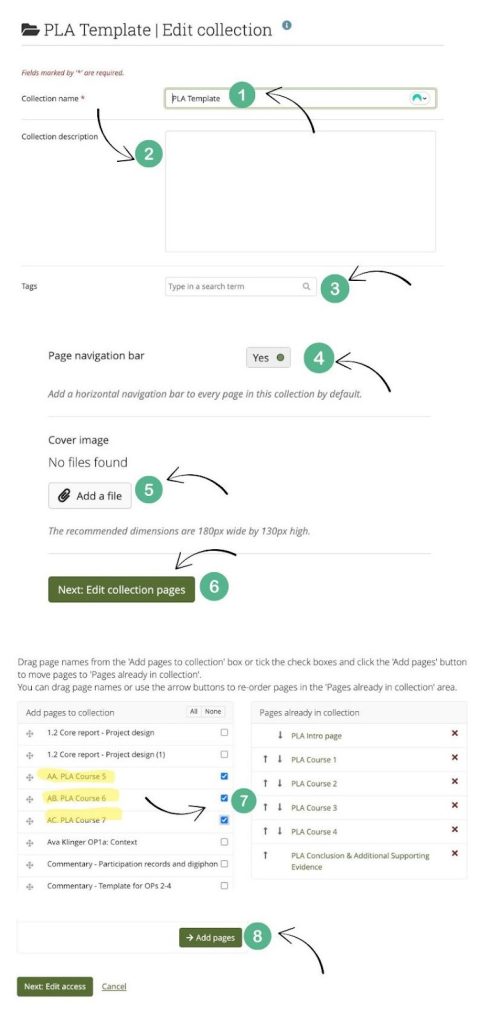
- Rename your collection. It would be good to provide your full name in the Collection Title as well as using PLA. An example is “Full Name’s PLA Submission”
- You can add a collection description here if you wish. This section is optional.
- You can also add any tags that might help you organize your work in the future. PLA would be a good tag to add here.
- Make sure the Page navigation bar is turned to “Yes”
- If you have a cover/banner image you would like to use for your collection, you can add this now, or you can come back to this later. The cover image is optional.
- Click “Next: Edit collection pages”
- Place a checkmark next to each of the additional pages you copied for your collection
- Click “Add pages”
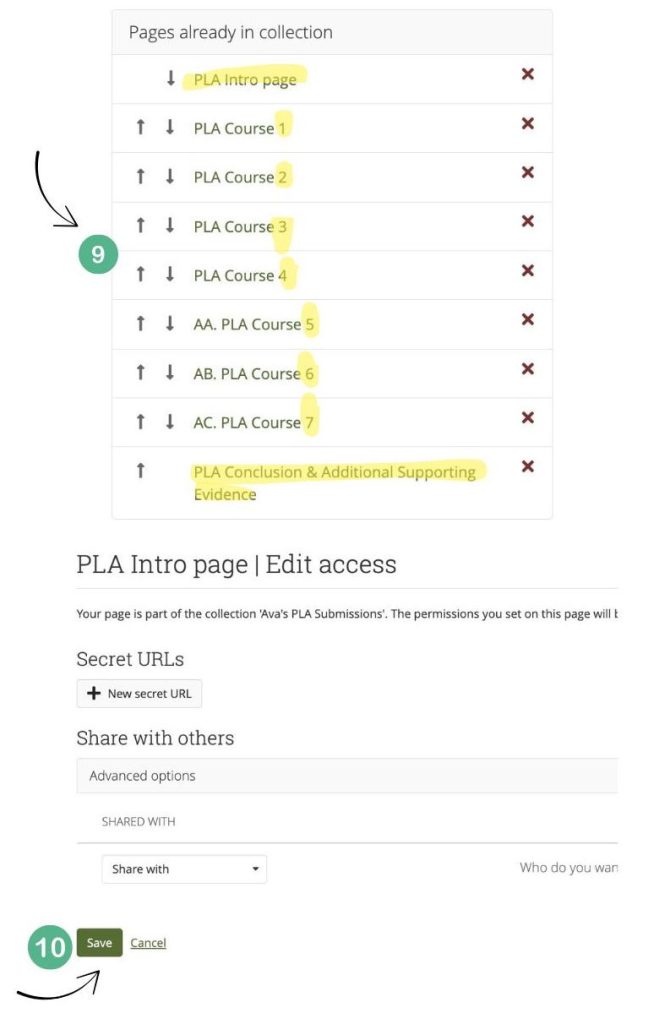
- Make sure the pages are all in the correct order. You can use the arrows to move the pages up or down. Make sure that the intro page is at the top and the PLA conclusion and supporting evidence is at the bottom.