Your portfolio is more than just text—it’s a chance to showcase your story in a dynamic and engaging way. Adding multimedia elements such as photos, videos, audio clips, Google Docs, or other interactive materials can bring your experiences to life and give your reviewers a fuller picture of your journey. These tools can highlight your creativity, demonstrate your skills in action, and make your portfolio more memorable. Think of multimedia as a way to add depth and texture to your written reflections, helping your collection feel both professional and personal.
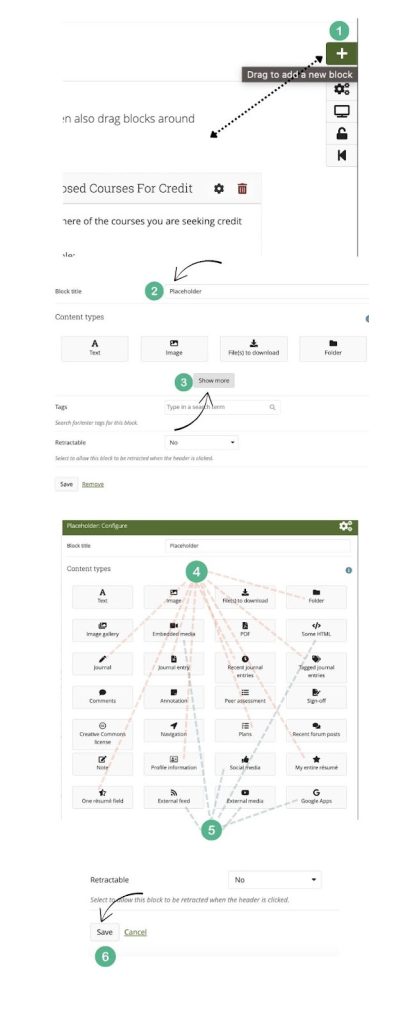
- To add a new “Block” of content to your page, click down on the + icon on the top right hand corner of the page and drag it into the space you want to add the content.
- Once the block content window appears, rename the block. You can also leave it empty if you don’t want any text to show up in that space.
- Click “show more” (you might have to do this multiple times for all of the block options to appear.
- As you can see in the graphic below, there are different types of blocks. The blocks you are already familiar with are the text and image blocks. Feel free to add more text blocks and images blocks as needed. The blocks connected to the number 4 in the graphic are ones that have to be built out in iCAAFS and are fed internally to your page. You do not need to worry about the internal blocks for this portfolio, but if you’re curious about using them, go to the main menu and click on Journals, Notes, Plans, or Resume to build those out internally.
- There are also blocks that will connect the page to data externally, such as Google apps, external html, external feed, etc. You can grab links or embedding codes from the original source of the media you wish to share in here.
- Click “save” before exiting out of the window.